|  | The Final Say! | | Design
9.9 | Usability
9.9 | Installation
9.9 | Value
9.9 |
Microsoft Wireless Optical Mouse Blue
- reviewed by Andrew B
& Tory F
Review Date: 19th November 2002
Review Score: 9.9/10
Distributor: Microsoft | |
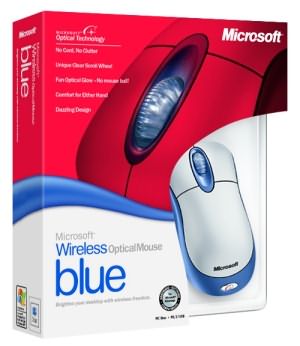
The new
Microsoft Wireless Optical Mouse Blue offers support for the following
systems, Windows XP, 2000, ME, 98, Windows NT and Macintosh computers.
Features of the Microsoft Wireless Optical Mouse Blue -
No Cord, No Clutter (Keep your desktop
clutter-free with the wireless optical mouse that works up to 6 feet away
from the receiver (receiver included)) -
Unique Clear Scroll Wheel (Have fun using
the one of a kind, wider scroll wheel to move through documents quickly
without a scroll bar.) -
Go with the Optical Glow (The glowing red
base signifies Microsoft optical technology for a smooth and accurate
experience. No mouse ball!) -
Comfort for either Hand (Comfortably shaped
for he right or left hand.) -
Dazzling Design (Silver metallic top and
astral blue accents add sparkle to your desktop.)
Our first impression
of the mouse was how comfortable it was to actually hold. The contour of
this product was such that we found that it could be used quite comfortably
with either the left or right hand. |
|
The beauty of
this mouse being wireless is that it eliminates the cumbersome cord, leaving
a much cleaner, more organized desktop. However, if you do need to leave
your desk, we found that the range of the receiver to be approximately 2 metres
and still worked with a good degree of accuracy. This mouse is clearly
designed for comfort and installed extremely easily through both the PS/2 and
USB ports. We tested the mouse on Windows XP and found that it worked
automatically without utilizing the installation CD, however, to get the
most benefit out of this mouse, we do recommend that you do install the
software. Another feature of the mouse is the extremely comfortable wheel
button that is almost soft to touch and can be used as a third clickable
button. The scroll wheel is also
perfect for scanning through large documents and in general surfing the
world wide web.
For those of you that are not fully aware
of what an optical mouse is, it basically eliminates the mouse ball which
is used to determine the direction of the mouse pointer would travel on your
screen. One of the main problems with the mouse ball was that quite often dust
would collect inside the ball cavity, rendering the mouse movement to be
inefficient. The optical sensor replaces the mouse ball with an optical
sensor that scans the surface underneath it, this is quite often
characterized by a red light.
By using optical technology this
eliminates the need for a mouse pad as the optical sensor works on almost
any surface that will not defuse the light emanating from the mouse. The
accuracy of the mouse was excellent for moving around the operating system
and performed extremely well for Office XP. Even for games such as
first person shooter titles, the mouse also performed exceptionally well and
there was no significant delay between moving the mouse and it responding to
our commands, it worked just as well as a corded mouse.
|
Microsoft
Wireless Optical Mouse Blue Requirements
|
- Windows XP, 2000, ME, 98, NT
-
Macintosh Operating System
- PS/2 or USB port
-
Hard drive space (25MB Windows O/S)
- Hard
drive space (15MB Macintosh O/S)
- Pentium 133Mhz or
greater (Pentium 233Mhz XP)
- CD-ROM or DVD-ROM Drive
|
We would highly recommend this mouse to
all PC and Macintosh users as it eliminates the mouse cord and makes your
computer experience more efficient. The beauty of this mouse is that it
works straight out of the packet and comes with two AA alkaline energizer
batteries. Highly Recommended!
- Andrew B
& Tory Favro Copyright ©2002 www.impulsegamer.com |