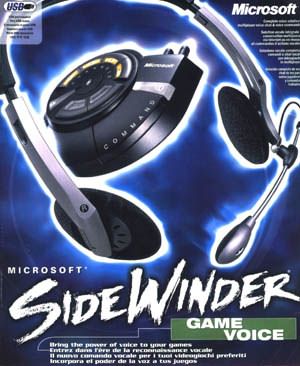
| There
has been quite a few gaming voice devices on the market that allow you to
talk to others via multiplayer games through headsets and the like but
Microsoft have taken this one step further. The SideWinder Game Voice
supports a myriad of functions that truly enhances your multiplayer and
single player gaming experience. The unit itself contains many pre-built
command profiles but the true beauty is that you can create your own. The
Game Voice allows you to program voice commands that can be used as
hotkeys in all Windows games. That is, you can program certain voice
commands to tell your team bots to regroup, capture the flag, guard the
area or even swap between weapons. The
Game Voice was tested under Unreal Tournament and once the
"voice" hotkeys were set up, I could literally tell my team what
to do when I was playing capture the flag. Gone are the days of pushing
buttons on your keyboard as all I had to do was give the voice command and
my bots went into action. Apart from an amazing single player experience,
Unreal Tournament multiplayer was truly fantastic and you can actually
have real life conversations with other players without any bandwidth
compromisation. If you have access to ADSL or Cable, then the Game Voice
is probably the coolest thing you could ever have. Even on a 56k modem,
there was hardly any loss in speed and the speech quality was
excellent. The
installation of the Microsoft SideWinder Game Voice was extremely easy and
plugged straight into the USB port. I really need to get some more USB
ports one of these days though. Windows XP detected the new device
immediately upon installation and it then proceeded to install the
relevant drivers and software from the CD. It should be noted that
users must have the Game Voice or Game Voice spawn installed on their
systems if they are to hear you talking but there are enough gamers on the
net that actually do have this. System Requirements
- Pentium 233Mhz or higher processor
with MMX
- 64MB RAM
- 45MB available hard drive space
- Quad-speed CD-ROM drive
- 256 colour display or higher
- USB
| -
TCP/IP LAN or Internet connection
- Sound card with full-duplex chip set and
functional line out/microphone jacks
- Microsoft Internet Explorer 5.0 or higher
- DirectX 8 or higher
- Pointing device such as a Microsoft
Mouse or Intellimouse
|
As
with all Microsoft products, the support page for the Game Voice is first
class and offers a variety of downloads such as patches and drivers if
needed. It should be noted that most of these downloads are not needed
because the SideWinder works straight out of the box immediately.
In
conclusion, the
Microsoft SideWinder Game Voice is a must have gaming device because it
truly enhances your gaming experience. Just make sure you tell family and
friends about this device because you may be receiving some strange looks
when you are playing games on your computer. It's PC Gaming at its best,
Highly Recommended!
- Andrew B Copyright ©2002 www.impulsegamer.com |