|
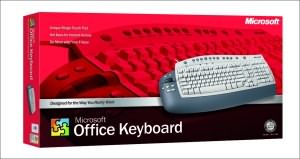
The entire surface of
the Office Keyboard is littered with shortcut keys to all sorts of items and
programs. It's smart intuitive design will ensure that in no time you will
be relying upon it for your day to day computer use. Essentially there are
so many common sense items on this keyboard that I could not see any reason
that you would look further other than if this keyboard was cordless. In
fact that is the only reason this keyboard is not scoring 10/10 is that it
is corded. Truth be told, that is not exactly a huge problem other than mild
desk clutter.
Installation of the keyboard was easy, however be sure to install the
software first before fully using the keyboard. The keyboard connects via
USB or PS/2 and in some circumstances detects automatically depending on
your operating system. We tested this keyboard under Windows XP.
To the left of the keyboard are some
great timesaving features including scroll wheel, cut, copy and paste keys,
and most importantly for someone like me who lives in front of their
computer, there is also an application switching button that lets users
toggle through active applications. This function is brilliant, yet so
simple.
|
Microsoft
Office Keyboard Requirements
|
- Windows 98 or Windows Millennium Edition with a Pentium 133
MHz or higher processor and 32 MB of RAM
- Windows NT 4.0
Workstation or Server with Service Pack 6 or later (no USB support) with a
Pentium 133 MHz or higher processor and 64 MB of RAM
- Windows 2000 Professional or Server with a Pentium 133 MHz or
higher processor and 128 MB of RAM
- Windows XP Home
Edition or Professional with a Pentium 233 MHz or higher processor and 128MB of
RAM
- 35 MB of available hard-disk space
- An available PS/2 or Universal Serial Bus (USB) port (USB
requires Windows 98, Windows Millennium Edition, Windows 2000, or Windows XP)
- Microsoft Internet Explorer version 5.0 or later to view Help
files
|
The staggering amount of times this keyboard has been of help to me even
during this review demands that you give the purchase of it a lot of
thought. Highest recommendation!
- Tory Favro
Copyright ©2002 www.impulsegamer.com |